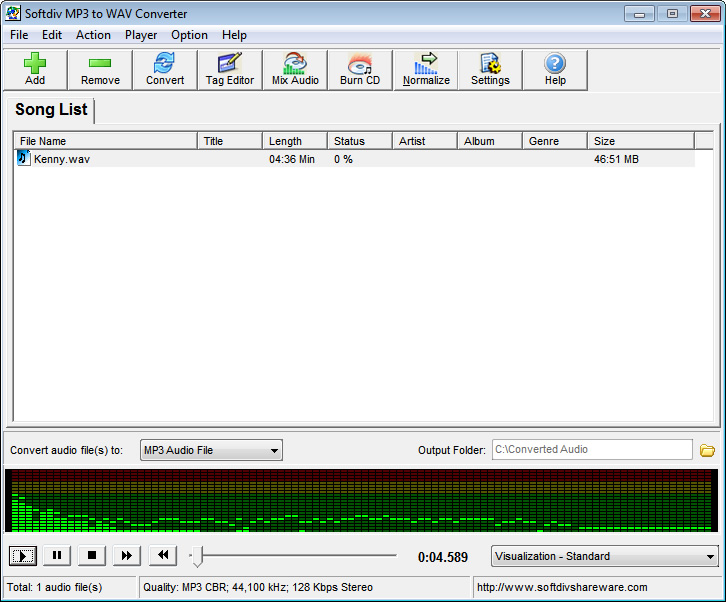
Despite its name, Softdiv MP3
to WAV Converter handles much more than just simple audio
conversions. Though the interface is simple enough to use,
its multiple tabs lend it a chaotic, cluttered feel that may
frighten first-time users. Besides the two audio codecs found
in its title, this program can also support OGG, WMA, and
VOX files. The standard settings for selecting audio quality
are easy to access, but it was this application's extras that
really floated our boat. First of all, the utility lets you
play DJ by giving you the option to mix several audio files
together.We also appreciated the built-in CD burner and the
ability to normalize tracks. The audio player is rather bare-bones,
but the presence of six colorful visualizations helped us
overlook its lack of fast-forward and rewind controls. Since
it does much more than most garden-variety audio converters,
we give this program our kudos....
Freedownloadcenter.com -
MP3 converters have come a long way from being
simple ugly-looking utilities running under DOS to advanced
applications capable of batch converting, supporting drag'n'dropping
and other making-life-easier features. Softdiv MP3 Converter
is a good example of such a sound converter.
Softdiv MP3 Converter lets you convert MP3s to WAVs and back,
both individual files and batches of files. There are two
tabs: one for converting MP3s to WAVs, another - WAV files
to MP3 ones. Just drag the files into the appropriate tab,
adjust settings and click 'Convert'. The speed of the conversion
process greatly depends on your computer performance.
The tool also has a built-in ID3 tag editor and a sound player.
The latter lets you view what frequency range a certain file
occupies. Try this converter today and check it out yourself.