Award Winning Audio & Video Software    
HomeProductsDownloadPurchaseSupportContact usAbout us
Audio Software
Dexster
Easy Talking Notepad
Softdiv Audio Converter
Softdiv MP3 to WAV Converter
.
Video Software
iVideoMAX
iDVDMAX
VIDEOzilla
SNOSH
 
Services
Forum
Download
Purchase
Upgrade
Support
Testimonials
.
Company
Contact Us
Press Release
About Us
Links


iVideoMAX- convert all video formats (MPEG,AVI,RM,WMV,ASF, MOV)
Video Converter
iVideoMAX 3.9
Price: USD 29.95
Platform: Windows 98se, ME, XP, NT, 2000, 2003
 
Free Download Free Download Purchase Purchase
System Requirements
Screenshots
Award Reviews
Tutorials
FAQ
 

iVideoMAX is a powerful and effective solution for video file conversions. This easy-to-use interface allows you to convert video files between different formats, create new video files from sequence of separate images, split or join video and also preview the results to make sure that you achieve the desired effect.

Other advanced features including exporting your movie into a sequence of pictures and burn Video CD from MPEG file.

 
The major supported video formats are:
  • AVI (DivX, XviD, MS MPEG-4, Uncompressed, Cinepak and other)
  • MPEG (MPEG (MPEG-1 and MPEG-2 Video, VCD and SVCD, PAL, and NTSC)
  • WMV (Windows Media Video)
  • RM (Real Networks Video) - write only
  • DVD format
  • ASF format
  • QuickTime MOV format - read only
 

Key Features:

  • Convert AVI to MPEG
  • Convert AVI to RM
  • Convert AVI to WMV
  • Convert MPEG to AVI
  • Convert MPEG to WMV
  • Convert MPEG to RM
  • Convert WMV to AVI
  • Convert WMV to MPEG
  • Convert WMV to RM
  • Export Video to set of Pictures
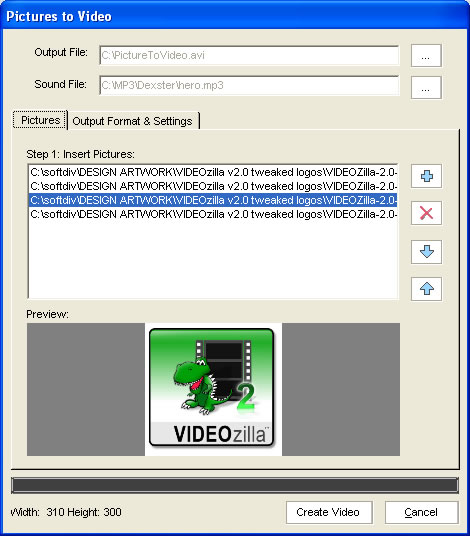
  • Create Video with Pictures
  • Step by Step Wizard
  • Video Player
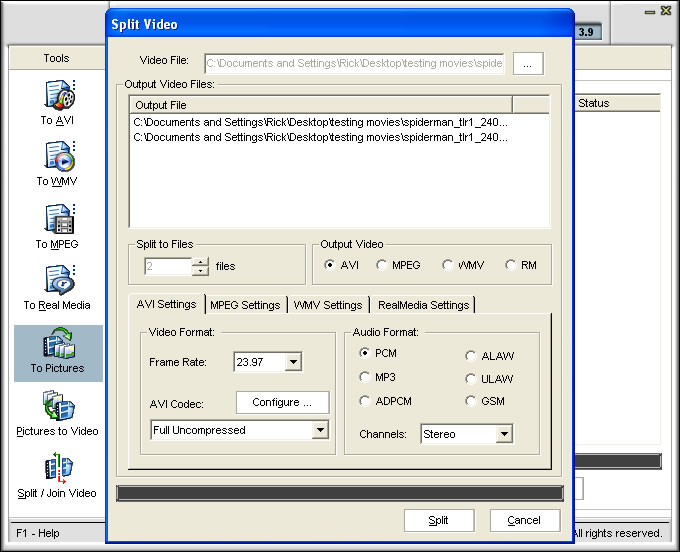
  • Split Video Files (Support AVI,MPEG,ASF,WMV,RM,MOV,QT now)
  • Convert MOV to AVI
  • Convert MOV to MPEG
  • Convert MOV to WMV
  • Convert MOV to RM
  • Burn VCD/SVCD (Support DVD Drives now)
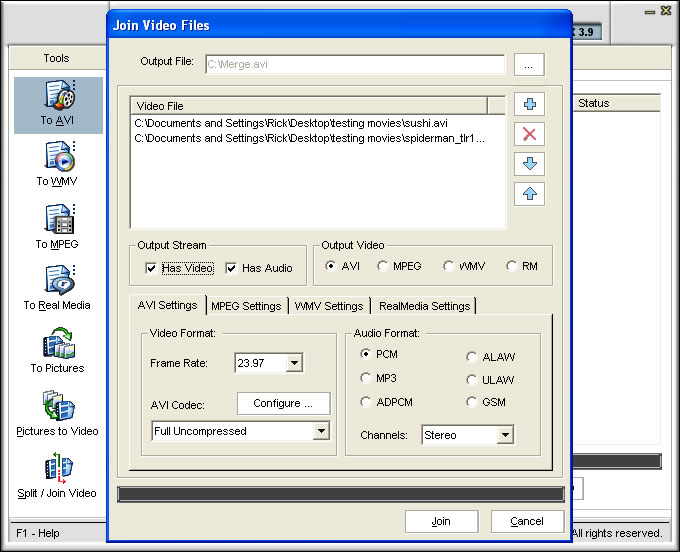
  • Join Video File(s) (Support AVI,MPEG,ASF,WMV,RM,MOV,QT now)
  • Batch Conversion
Screenshots:
Video Converter Main Screen
Video Converter - Create Video from Images
Video Converter - Extract Video to Images
Video converter - Split Video files
iVideoMAX Main Screen
Create Video from Images
Extract Video to Images
Split Video files
       
Video converter - Burn Video CD
Video converter - Join Video files
Video Conversion
 
Burn Video CD
Join Video files
Video Conversion
 
 
System Requirements:
  • Microsoft Windows 98se, ME, XP, NT 4.0, 2000, 2003

  • Pentium 200 Processor
  • 64 MB RAM
  • 20 MB Hard Disk Storage
 
 
     Join Our Monthly Free NewsLetter

Subscribe to our FREE monthly newsletter to stay informed with our latest news, software release, software updates,special offers, and more.You can quickly and easily unsubscribe at any time by clicking a simple link in anyissue of the newsletter. Just simply enter your email address below and click submit to subscribe now.

Email Address:
 
Home
Products
Download
Purchase
Support
Sitemap
About us
Copyright © 2001- 2009 Softdiv Software Sdn Bhd. All Rights Reserved.