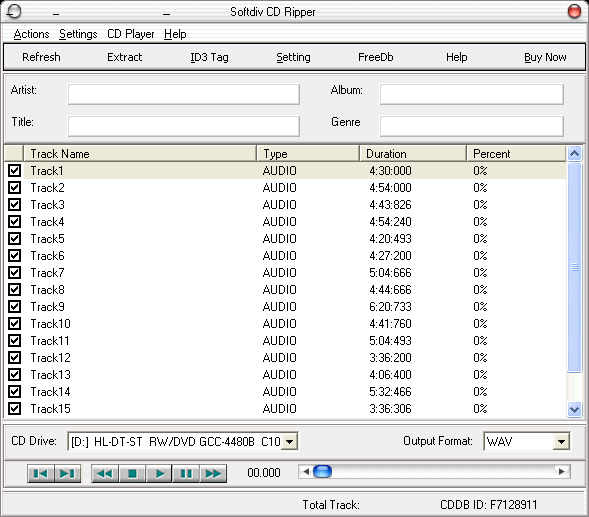
Although not the speediest ripping
application we've ever used, this program offers a hassle-free
way to turn your CDs into several forms of digital audio files.
Softdiv CD Ripper's clean, Mac-style interface is both elegant
and easy to use. Although the program can grab track information
from the online CDDB, it doesn't automatically do so when
you load a disc. We also should note that we couldn't get
the app to retrieve information for burned CDs, a capability
that many of its competitors possess.
The app outputs files as WAV, OGG, MP3, or WMA, though the
trial version only lets you use the first three options. You
can set audio quality for all supported formats or encode
files in the VBR mode if you opt for MP3 or OGG. When set
to encode MP3s at 128Kbps, the utility didn't extract tracks
anywhere near as quickly as many other rippers we've tested.
On the plus side, you can apply both high- and low-pass filters
to your new files, and the demo allows you to rip as many
tracks as you want durning the nine-use period. Unless you're
pressed for time or impatient, Softdiv CD Ripper deserves
a look.
Freedownloadcenter.com Review -
If you have a collection of Audio CDs and
only one CD-ROM to listen to them on your computer, you are
eventually bound to get tired of changing CDs every hour or
so. Use Softdiv CD Ripper to extract CD tracks to digital
audio and listen to them right from your hard disk.
Softdiv CD Ripper is a powerful utility that lets you rip
CDs, convert and save audio tracks to any of the following
formats: MP3, WMA, OGG, WAV, RAW, VOX, G.723, and G.726. It
is also capable of converting your own sound files to and
fro MP3, WMA, OGG, and WAV. Its simple, intuitive interface
will not cause you any problems even if you haven't ripped
audio CDs before.
The tool also has a built-in sound player and ID3v2 tag editor.
What's more, it can connect to CDDB (Internet Compact Disc
Database) and retrieve information about your CDs. Try this
tool today and check it out yourself.