Award Winning Audio & Video Software
Audio Software
Dexster
AUDIOzilla
Softdiv MP3 to WAV Converter
My Audio Cutter
DJ Mix Studio
Video Software
RECORDzilla
VIDEOzilla
SNOSH
Photo Software
Photopus Pro
Softdiv PDF to Image Converter
MyPhotoSweeper
Misc Software
Easy Duplicate Cleaner
Services
Forum
Download
Purchase
Upgrade
.
Softdiv CD Ripper
- Online Tutorials
Softdiv CD Ripper
- Online Tutorials
Softdiv CD Ripper 3.1
Price:
USD 19.95
Platform:
Windows 98se, ME, XP, NT, 2000, 2003
Purchase
Softdiv CD Ripper Online Tutorials:
CD Ripping:
How to extract CD to MP3/WAV/OGG/WMA
CD Player:
How to use CD Player
FreeDB:
How to connect to FreeDB to retrieve disc information
ID2v2 Tag Edit:
How to edit audio information
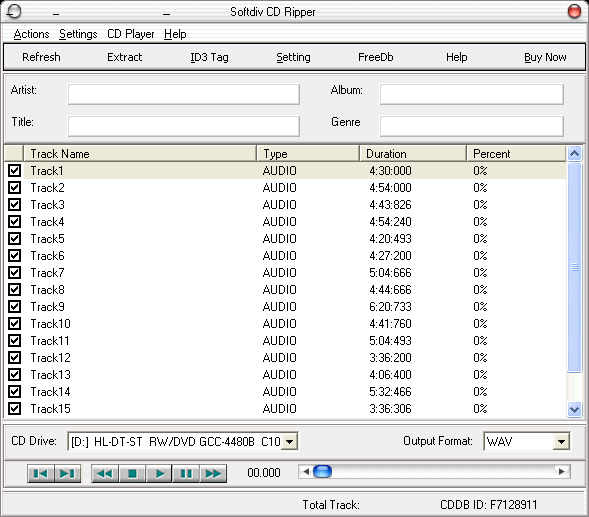
How to extract CD to MP3/WAV/OGG/WMA
1. Insert Audio CD into the CD-ROM
2. Select the CD Drive combobox for the inserted CD drive.
3. Select the Output format combobox. It can be WAV, WMA, OGG or MP3.
4. Check the track that you want to extract and click on Extract button to start the ripping.
back to top
How to use CD Player
1. Insert Audio CD into CD-ROM and click refresh button.
2. Select track to be played at the track list.
3. Click on play button to play.
back to top
How to connect to FreeDB to retrieve disc information
1. Insert audio CD into CD-ROM and click on Refresh button.
2. Make sure you are connected to the Internet.
3. Click on Freedb button so start querying Disc info.
4. If the Disc info is found, all the tracks name will be changed according to the Freedb
back to top
How to edit audio information
1. Click on ID3 Tag to launch ID3v2 tag editor.
2. Click on ... button that beside Set button.
3. Select audio file for editing.
4. Change the audio info then click on Set button
back to top
Home
Press
Download
Purchase
Links
Sitemap
About us
Copyright © 2001- 2017 Softdiv Software Sdn Bhd. All Rights Reserved.